The capability of AWS Network Firewall to match traffic based on the AWS resources involved in sending and receiving it, rather than relying solely on IP addresses, has been introduced with context-aware rules. These rules possess the capacity to reference specific elements such as a virtual private cloud (VPC), a security group, a subnet, or a transit gateway attachment. Traditional rules that depend on IP addresses face the operational burden of constantly updating to accommodate every workload that undergoes scaling, replacement, or movement; this maintenance is particularly challenging for ephemeral workloads. For instance, a VPC-attached AWS Lambda function can begin transmitting traffic before an updated IP address list has reached the firewall. By implementing context-aware rules, it becomes possible to filter traffic originating from a function using the security group associated with it.
With the advent of context-aware rules, several operational advantages become available: the ability to craft rules that dynamically track workloads—a rule referencing a security group will apply to any new resource possessing that security group's network interface; similarly, a rule referencing a subnet or VPC applies to any newly launched resource within it; and a rule referencing a transit gateway attachment will affect traffic entering via that attachment. Furthermore, these rules enable the application of a singular policy across multiple accounts, as one context store maintains a record of all resources connected to a shared transit gateway, allowing a rule to reference context from any of those participating accounts. Finally, the firewall's logs provide visibility into the specific resources behind each communication flow, alongside their corresponding IP addresses. This article details the mechanics of these context-aware rules, outlines the process for setting them up across accounts, and illustrates the data captured in the logs.
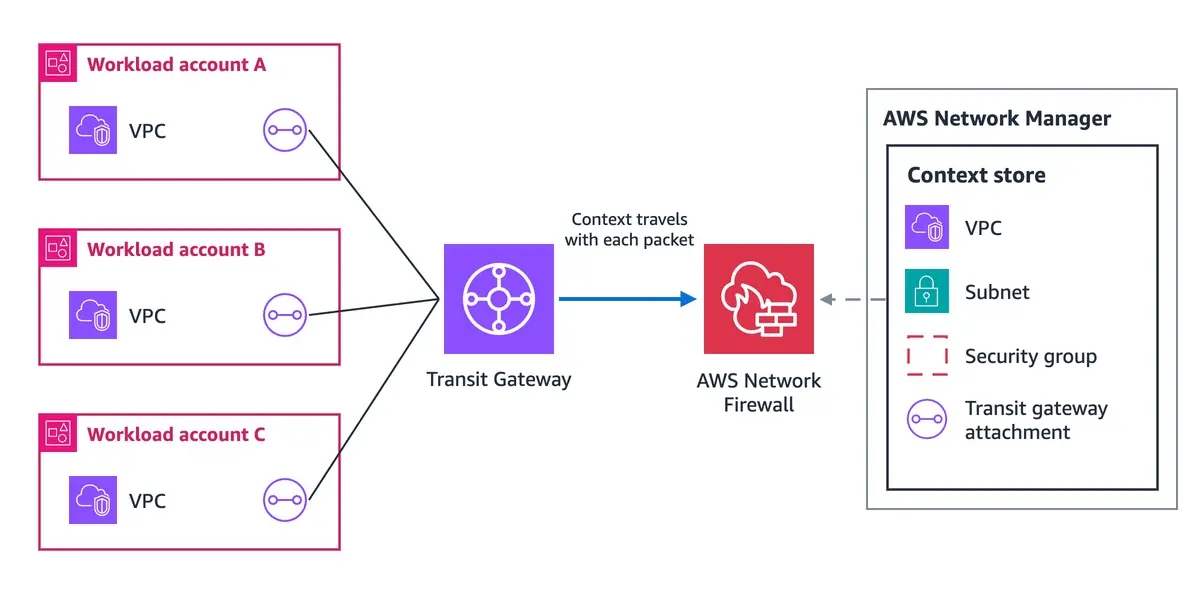
The operation of context-aware rules necessitates the use of firewalls attached to a transit gateway, employing a combination of a control path and a data path. On the control path, a context store informs the firewall about the existing AWS resources. Meanwhile, the transit gateway annotates every packet with the sender's context as it traverses the data path, allowing the firewall to correlate this context against the defined rules.
A context store functions as an inventory of the AWS resources capable of generating or receiving traffic through a transit gateway. This store must be established within AWS Network Manager and linked to the transit gateway utilized by the firewall. When workload accounts share the transit gateway via AWS Resource Access Manager (AWS RAM), those accounts establish transit gateway VPC attachments, and the context of these attachments and the resources they represent subsequently appears in the shared context store. This context store is engineered to maintain synchronization as resources are added or decommissioned. The transit gateway itself annotates each packet; when traffic passes through it, the gateway tags the packet with the context of its source, which includes the sender's VPC, subnet, transit gateway attachment, and associated security groups. The firewall receives only the security group IDs, not the rules contained within them, so referencing any one of those groups in a rule results in a match. The firewall then compares the context IDs present in its rules against the context found on each packet. To facilitate this, context IDs are grouped into a context set, which acts as a named rule variable listing resources from the context store linked to the firewall. This set can then be employed in either the source or destination field within a Classic or Next Generation firewall policy. Source context is universally applicable across all protocols because every packet carries the context of its originator; conversely, destination context is restricted to TCP-based rules because the firewall ascertains the receiving resource through return traffic. For deeper technical information, reference "How context-aware rules work" and "Matching on destination context." AWS Transit Gateway also facilitates context sharing with third-party firewalls through the Gateway Load Balancer, which is detailed in "Introducing resource context for firewall policies with AWS Transit Gateway."
These context-aware rules are available without incurring extra charges; standard fees for AWS Network Firewall and AWS Transit Gateway apply based on utilization. These features are operational in AWS Regions where both Network Firewall and Transit Gateway context sharing are supported.
This development aligns with the broader industry trend toward increasing automation and granular control over network infrastructure, moving away from static, IP-dependent configurations toward identity-aware policy enforcement.
To begin implementation, consider an architecture where a central networking account manages both the transit gateway and the firewall, sharing the gateway with various workload accounts via AWS RAM. The initial steps (1 and 2) are executed once in the account that owns the transit gateway. First, a context store must be created: in the AWS Network Manager console, one selects or establishes a global network and registers the transit gateway with it, followed by the creation of a context store associated with that gateway. Network Firewall automatically detects the context store, requiring no specific configuration on the firewall itself. Second, Network Firewall must be granted access to the context store: in the account housing the context store, the AWS Identity and Access Management (IAM) role named NetworkFirewallContextStoreReadOnly must be generated, utilizing the trust policy and permissions outlined in "Onboarding your transit gateway to a context store." This role needs to be created once for every account that maintains a context store. Third, a context set is established: within the Amazon Virtual Private Cloud (Amazon VPC) console, under Network Firewall, a rule group is created. On the Rule group variables page, the user selects "Create context set," specifies the context store, and then chooses the resources comprising the set; a single set can aggregate context IDs from various resource types across the accounts present in the context store. Fourth, the synchronization status must be verified: prior to defining rules, the firewall's details page should be accessed to check the Context store sync state section, which reports the discovered context store and its current synchronization status. Fifth, the context set is integrated into the rules: the example rule found in "Writing context-aware rules" prohibits SSH traffic originating from PROD_RESOURCES destined for locations outside the organization's internal networks. In a Next Generation firewall rule group, the Visual rule builder is utilized on the Configure rules page, selecting Drop and TCP. For Sources, the criteria should be set to Match specific criteria, selecting Context sets, and choosing PROD_RESOURCES. For Destinations, the criteria should be Match specific criteria, selecting Destination IP, and inputting $EXTERNAL_NET, with the destination port set to 22, after which the rule group is added to the firewall policy. The equivalent rule in Suricata-compatible syntax is drop:flow tcp:all $PROD_RESOURCES any -> $EXTERNAL_NET 22 (msg:"Block SSH from production to external"; sid:2001;). In raw rules, a context set is referenced using $ followed by its name; in the console, it is selected from a list. Because the rule references resources rather than addresses, it automatically covers any new resource launched in those VPCs or any security group attached to them. For Classic policies, the identical rule structure appears as drop tcp $PROD_RESOURCES any -> $EXTERNAL_NET 22 (msg:"Block SSH from production to external"; sid:2001; rev:1;).
When the transit gateway is linked to a context store, Network Firewall incorporates a context object into both its alert and flow log entries. A simplified illustration shows an outbound TLS connection from an application instance to example.com, routed through a central egress VPC containing a network address translation (NAT) gateway. If a rule referencing the application's security group blocks this connection, an alert log record is generated, and the matched list names the security group that triggered the match. { "event": { "event_type": "alert", "flow_id": 314246768212473, "src_ip": "10.1.1.25", "dest_ip": "203.0.113.10", "dest_port": 443, "app_proto": "tls", "tls": { "sni": "example.com" }, "context": { "matched": [ "sg-0a1b2c3d4e5f60031" ] }, "alert": { "action": "blocked", "signature_id": 2002, "signature": "Application A: domain not on its allow list" } } }. The flow log record for the same flow_id details the complete context for both sides. The src list contains the sender’s context IDs. Flow logs capture this context for every flow, even those not matching a rule. { "event": { "event_type": "netflow", "flow_id": 314246768212473, "src_ip": "10.1.1.25", "dest_ip": "203.0.113.10", "dest_port": 443, "app_proto": "tls", "context": { "src": [ "vpc-0a1b2c3d4e5f60001", "subnet-0a1b2c3d4e5f60011", "tgw-attach-0a1b2c3d4e5f60021", "sg-0a1b2c3d4e5f60031" ], "dst": [ "vpc-0a1b2c3d4e5f60003", "subnet-0a1b2c3d4e5f60013", "tgw-attach-0a1b2c3d4e5f60023" ] } } }. The dst list illustrates how destination context functions for traffic heading toward the internet; since the firewall learns the destination from
Why it matters
This feature significantly improves network security posture by automating rule updates as workloads scale or move, solving the challenge of managing ephemeral IP addresses. For operators, this means policies can follow the workload identity rather than chasing constantly changing network addresses.