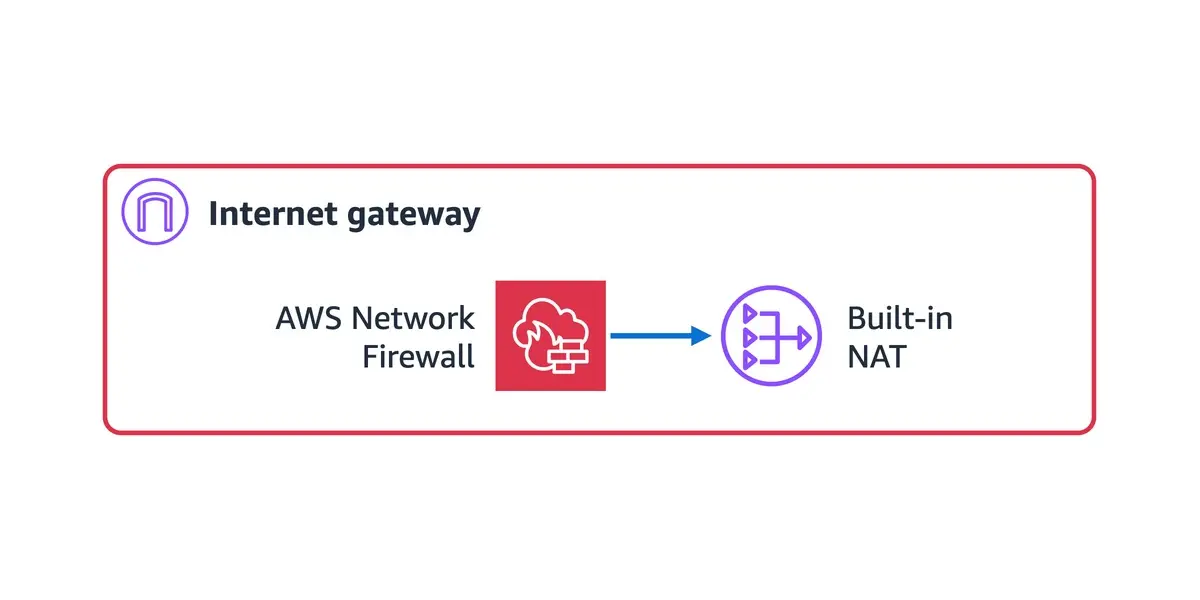
The mechanism for applying security policies across numerous Virtual Private Clouds (VPCs) is significantly streamlined with the introduction of automated internet firewall mode in AWS Network Firewall (Preview). This new capability enables the application of centrally defined rules to traffic traversing the internet gateway within every VPC. Furthermore, this mode incorporates native network address translation (NAT) functionality specifically for connections that are outbound only. For any subnet that requires internet access, a single route pointing directly to the internet gateway is sufficient.
Previously, to inspect internet traffic for a VPC, it was necessary to route every subnet through a firewall endpoint, and resources needing only outbound connectivity also required a NAT gateway. This automated mode simplifies that architectural pattern by relocating the inspection function to each VPC's internet gateway. Consequently, each subnet now possesses only one route leading to the internet gateway, where the firewall performs inspection and executes built-in NAT.
Each VPC receives its own dedicated firewall instance, rather than sharing capacity from a single firewall. When multiple VPCs are protected by one firewall using VPC endpoint associations, those VPCs share the capacity of that firewall within each Availability Zone. In contrast, automated internet firewall mode ensures that each VPC's firewall supports a throughput capacity of up to 100 Gbps per Availability Zone, as per service quotas. This design also accommodates VPCs possessing overlapping Classless Inter-Domain Routing (CIDR) ranges because their traffic does not converge in a shared inspection network where address conflicts could arise.
The firewall examines both inbound and outbound traffic. For outbound-only communication, the firewall first inspects the traffic before performing NAT, ensuring that logs and rules reflect each workload's private IP address. Built-in NAT translates outbound IPv4 connections originating from resources lacking a public IP address; IPv6 traffic does not undergo translation. If destination endpoints mandate that only pre-approved source addresses are accepted, an Amazon VPC IP Address Manager (IPAM) policy allows the operator to designate which NAT addresses automated internet firewall mode should utilize for outbound traffic.
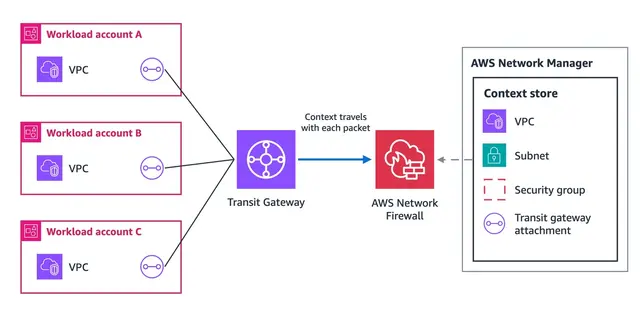
The system utilizes Network Firewall Next Generation firewall policies. Operators can commence using the AWSManagedTemplateIGWFirewallBaseline, which is a template maintained by AWS security experts. Beyond this, users can incorporate their own custom rule groups alongside AWS managed rule groups. It is important to note that automated internet firewall mode is limited to inspecting traffic that crosses the internet gateway; for traffic moving between VPCs or to on-premises networks via AWS Direct Connect or AWS Site-to-Site VPN, the recommendation is to employ a Network Firewall attached to a transit gateway.
Regarding subnet connectivity, prior to this release, a public subnet maintained a direct route to the internet gateway and its resources utilized public IP addresses, permitting both incoming and outgoing connections. Conversely, a private subnet lacked a direct route and accessed the internet via a NAT gateway. With automated internet firewall mode, any subnet reaching the internet can route 0.0.0.0/0 directly to the internet gateway, meaning the route table no longer needs to differentiate between public and private configurations; instead, the connectivity type of each subnet dictates how its resources interact with the internet.
The policy set within Network Security Manager determines the connectivity type, rather than individual subnet configurations. Table 1 illustrates the mapping between connectivity types and their operational models. For the Flexible setting (recommended), a single subnet can function as both public and private: a resource with a public IP address, such as an Elastic IP address, gains bidirectional access akin to a public subnet, while a resource without such an address receives outbound-only access via built-in NAT, mirroring a private subnet. The Bidirectional setting for a public subnet allows resources with public IPs to communicate both ways, but resources lacking public IPs cannot reach the internet. The Outbound-only setting, applicable to a private IPv4 subnet behind a NAT gateway or an IPv6 subnet behind an egress-only internet gateway, drops unsolicited inbound connections, while resources without public IPs connect outbound through built-in NAT, and those with public IPs retain their addresses. Finally, the Excluded setting designates a subnet where traffic bypasses both the firewall and built-in NAT. The firewall inspects traffic for all types except those marked as excluded (Figure 2). Each policy establishes one default connectivity type applicable to all subnets within its scope, though this can be overridden for specific subnets using tags or Amazon Resource Names (ARNs); if a subnet qualifies for multiple overrides, the first one listed takes precedence.
These connectivity types also dictate which inbound connections are permitted to reach the resources. The firewall inspects inbound connections destined for resources possessing a public IP address when the subnet is configured as Flexible or Bidirectional, as illustrated by a Network Load Balancer serving a non-HTTP service in Figure 3. Figure 3 also depicts the outbound path, showing instances without public IPs routing through the firewall and subsequently through built-in NAT. For web applications and APIs, AWS WAF on Amazon CloudFront positioned in front of an Application Load Balancer remains the recommended approach; this load balancer's subnet can be set to excluded so that Network Firewall does not re-inspect the same request. It should be noted that the excluded designation applies in both directions, meaning any outbound traffic originating from that subnet also bypasses the firewall.
Management of automated internet firewall mode is performed through AWS Network Security Manager. When utilizing AWS Organizations, a central security team can issue policies from the Network Security Manager administrator account across the entire organization, to specific organizational units (OUs), or to particular accounts. Network Security Manager also supports a single-account setup, limiting policy application only to that account's VPCs. While deployment can begin via the Network Firewall or Network Security Manager consoles, the firewall itself is read-only when accessed outside of Network Security Manager. Network Security Manager operates using three core elements (Figure 4): Policy, which integrates rules and templates with connectivity type, enforcement mode, logging configuration, and priority; Scope, which defines the target—be it an organization, OUs, accounts, or VPCs; and Deployment, which links a policy to a specific scope. Network Security Manager subsequently generates and manages a firewall within every VPC falling under the defined scope.
This architectural model is particularly relevant when an enterprise manages numerous VPCs. Since Network Security Manager enforces the policy at the internet gateway, the firewall is engineered so that VPC owners or subnet owners lacking the appropriate permissions cannot circumvent inspection by altering routing tables. Subnets designated as excluded, along with Availability Zones where automated internet firewall mode is not supported, will not undergo inspection. While many organizations seek a uniform security standard across all environments, certain accounts, OUs, or applications may require rules beyond the standard baseline. To address this, two distinct policies can be created, each deployed to its own scope. The organization policy can house a baseline template, while the Account A policy can contain that same baseline template augmented with Account A's specific rules (Figure 5). The use of a template allows the baseline rules to be maintained once and reused across both policies. When policies overlap, the policy assigned the lower priority number takes full effect, and the policies do not merge. In the scenario of Account A, the Account A policy (priority 100) supersedes the organization policy (priority 1000), necessitating that the Account A policy incorporate the baseline template; furthermore, its defined enforcement mode, logging settings, and connectivity type will replace those from the organization policy. For further details, reference the documentation on how AWS Network Security Manager functions.
A crucial consideration for initial deployment, especially within VPCs already hosting active workloads, is to begin in monitor mode. In this state, the firewall records what the rules would dictate without actively dropping any traffic. Once the recorded logs confirm that the outcomes align with expectations, the policy can then be switched to enforcement mode.
In the realm of network traffic inspection, security teams frequently require two distinct capabilities from a firewall: the ability to permit only the necessary traffic for each application, and the capability to scrutinize every permitted connection against known threats. AWS Network Firewall provides this dual functionality through its stateful, managed network firewall and intrusion detection and prevention service. A Classic policy merges access rules and threat rules into a single stateful engine, causing them to share a singular rule capacity. Conversely, Next Generation policies assign separate engines for access control and threat protection within the same firewall. A firewall engine permits approved traffic while blocking the remainder, whereas an intrusion prevention system (IPS) engine examines the allowed traffic using either AWS managed rule groups or custom-written rules. Because each engine possesses its own dedicated rule capacity, the addition of access rules does not diminish the capacity available for threat protection. This section details the functionality of Next Generation policies, how they evaluate traffic, and the novel concepts they introduce, utilizing sample records to illustrate what each engine logs and how to validate a policy using the new monitor mode. The discussion concludes by demonstrating the construction of an example Next Generation policy.
A Next Generation policy examines traffic through two engines operating sequentially. Traffic permitted by the firewall engine proceeds to the IPS engine; traffic blocked by the firewall engine is stopped immediately. The firewall engine operates with a default drop posture, while the IPS engine defaults to a pass posture. Operators familiar with Suricata rules will find the two engines readily recognizable, as the firewall engine is built upon Suricata 8 firewall mode, which is...
The trend toward granular control and automated infrastructure management reflects a broader industry movement where platform operators are increasingly responsible for maintaining security posture across distributed, complex cloud environments. The ability to centrally manage policy application at the internet gateway level, rather than relying on distributed, per-VPC deployments, signifies a maturation in how infrastructure security can be operationalized at scale.
Why it matters
This feature significantly streamlines network architecture by eliminating the need to deploy individual firewall endpoints and NAT gateways in every VPC. Operators can now centrally manage internet traffic inspection across their entire environment, which is critical for maintaining consistent security posture.